We can't wait to hear from you
Connect
Discover how TMI credentials are designed to accelerate your career growth. Explore how TMI incorporates Talent Management into the practice and systems of Human Capital Management. Learn how you can steer your future confidently through TMI's research driven Talent Management standards. Fellow programs equip global HR professionals with the latest in Talent Management in the transformational way.
Explore how the TMP™, STMP™, and GTML™ credentials can take your HR career places, or add to the capabilities of your promising HR staff and leaders.
View CertificationsStrengthen your enterprise HR system by implementing the TMI-ETMS™ international standards.
Learn About TMI-ETMS™If you are interested in consulting, training or education, partner with TMI to join the global league of TMI aligned institutions, companies and industries.
Become a TMI PartnerLearn the latest about how Talent Management is transforming HR into a future oriented business hyperfunction.
Explore the TMI ApproachLearn the steps to earn your TMI certification, from application to successful completion and maintaining your credential.
TMI credentials include globally recognized digital badges, offering a portable and verifiable representation of your achievements.

Start your Talent Management career with TMI’s globally recognized certifications and resources to excel in your career.
Create myTMI Account TodayTMI Global and Associate Fellow programs turn HR professionals into global Talent Leaders who can drive growth with their superlative strategic ability, business perspective and readiness for change. Senior HR professionals and HR leaders from global organizations across industries have completed these programs, which establish new standards for the practice of talent management as a driver of organizational success and business competitiveness.
You can contact us here for more information.

TMI-ETMS10™ and TMI-ETMS14™ certified organizations are effective for restructuring Talent Management in an organization. With TMI, organizations are better, more agile and better prepared for challenges that are to come.
The TMI-Enterprise Talent Management Standards power enterprise HR with the latest in Talent Management.
To choose a TMI-ETMS™ version most appropriate for your organization!
Write to us via the contact form.

Partnering with TMI means building a powerful structure of Talent Management thought and practice resulting in business profits through standards, certifications and networks.
Get your HR staffers and managers TMI certified on Talent Management by adding TMI into your training regimen. One step toward embedding TMI credentials in your institutions curricula is to become a TMI-ETMS™ consulting partner. Join us to be a part of the groundbreaking work of Talent Management.

If you hold an elite international qualification in HR or a related discipline, possess a recognized HR credential, or studied HRM at a TMI-recognized institution, you may be eligible for an accelerated pathway to a TMI credential through QualiFly™ leading to TMP™, STMP™ or GTML™.
 Institutions
Explore Certification Bodies, Universities, B-Schools & Other Institutions recognized by TMI under the Q1, Q2, and Q3 Lists.
Check if your institution is recognized
TMI’s blogs cover the latest trends, insights, and best practices in HR and talent management.
Comprehensive guides covering talent development, HR metrics, key facts, and more.
Explore TMI's latest updates, announcements, news and press releases in our newsroom.
Strategic insights driving the future of talent, leadership, and global workforce excellence.
Dive into the inspiring journeys of TMI certification holders and learn how the certification has transformed their careers.
An Interview series featuring key advice from global talent leaders for future HR professionals.
TMI’s editorial team is comprised of researchers, writers, editors, proofreaders, and contributors with extensive experience in the HR and Talent Management space. The team scrupulously researches, analyzes and deliberates on each submission before concluding its suitability for our publications.

Each week, your HR team spends an entire day on repetitive, step-by-step tasks that add little strategic value. Signatures get chased on onboarding forms, payroll changes get re-keyed by hand, the same policy questions get answered again, and interviews get scheduled one by one.
This is work that rarely requires judgment and rarely stops coming. With increasing workloads but no growth in headcount, strategic initiatives often get delayed.
HR automation plays a central role in driving HR effectiveness. By handing repetitive, rules-based tasks to software, you cut the manual load on your team and give them more time for what genuinely needs a person, from workforce planning and employee development to the judgment calls that shape culture. The return has two parts, the hours recovered and the higher-value work your team can take on with them.
This article explains what HR automation means and which workflows are ready for it, then walks through the tool categories, real examples of automation at work, and the benefits alongside the limits. It closes with a practical rollout framework and the skills you need to lead the change well, going beyond simply buying it.
HR automation is the use of software to carry out repetitive, rules-based HR tasks with limited manual effort. A workflow that once needed a person to move data between systems or apply a policy runs with little manual effort once the rules are set, though a person still monitors it and handles the exceptions.
Two forms of it work together. Traditional automation follows fixed rules, running a defined sequence the same way every time, as in a payroll run. AI goes further, using models that predict outcomes and generate content, such as screening applicants or drafting a job description. Rules handle the structured steps, and AI handles the parts that call for pattern recognition. You can see how this fits the wider shift in this look at technology-driven talent management.
That difference sets up the one distinction that governs how you deploy either form, the line between automation and augmentation. Automation means software completes a task end to end, where the output is correct by rule and no one needs to weigh in. Augmentation means software does the heavy lifting but a person still decides, like an AI tool that ranks candidates while a recruiter makes the call. The test is whether a wrong output causes harm. Bounded, low-risk work can be automated outright, while anything that shapes a decision about a person should be augmented, with a human holding final judgment.
To decide whether a task is worth automating, run it through four questions. Does it run at high volume? Does it follow consistent rules that rarely change? Do you already track its current cost or time? And does a wrong output carry low risk?
A task that answers yes to all four is a strong candidate for full automation. One that fails the last question belongs in the augmentation column, automated in part but kept under human review. The workflows below score well on the first three and tend to deliver returns quickly:
Starting with one of these gives you a contained pilot where the returns are easy to measure, which builds the case for wider adoption.
The tools that support HR automation fall into a few clear categories, and understanding what each one handles helps you match a tool to the workflow you want to improve:
A newer category deserves attention. AI copilots and assistants answer employee questions and guide people through self-service tasks, some as conversational chat and others sitting inside the tools your team already uses. Their value grows as they take on more of the routine contact that once landed in an HR inbox. Depth of integration decides how much they help, since one that can only recite policy adds little, while one that can act on the underlying systems genuinely removes work.
Recruiting is where HR automation runs most visibly today. In its 2025 Talent Trends research, SHRM reported that just over half of organizations use AI to support recruiting, most often for writing job descriptions and screening resumes. Nearly nine in ten of those users say it saves time or increases efficiency.
Onboarding shows it most clearly. Manually, a coordinator writes the offer and emails IT for accounts, then sends forms one by one and chases signatures over days. Automated, an accepted offer triggers the sequence. The system creates the paperwork and requests the accounts, then routes each form with reminders until it is done. The coordinator watches a dashboard and steps in only when something stalls, turning a task that once filled parts of a week into a background process.
An employee query follows the same shift. Asking how much leave you have left once meant emailing HR and waiting for a reply from a separate system. An assistant connected to the HRIS now reads the balance and answers in seconds, escalating only when a question falls outside the rules. The routine contact clears itself, and the inbox holds the cases that need a human.
The strategic effect outweighs the hours saved. As automation absorbs the administrative volume, your team's time moves to planning and people development, where HR contributes most directly.
The benefits are concrete, and they compound across every workflow you automate:
The limits are just as real. Full automation of the HR function stays out of reach, and the people it serves would resist it even if the technology allowed it. In its State of AI in HR 2026 report, SHRM found that even if technical barriers disappeared, 72 percent of HR professionals believe nontechnical ones would still prevent full automation, and 87 percent of them point to a preference for human interaction among employees and applicants as well as leaders.
That finding carries a clear message. Automation suits the routine and the rules-based, while the parts of HR that involve empathy and difficult judgment stay human. The goal is a division of labor where software handles volume and people handle what only people can do.
A successful rollout is a sequence of deliberate steps, and treating it as a single purchase is where many efforts go wrong. The gap between adopting a tool and getting value from it is wide. In a survey of HR leaders, Gartner found that 88 percent said their organizations had not yet realized significant business value from AI tools. The approach below contains the risk while it builds the evidence, proving value on a small scale so a misstep costs only a pilot.
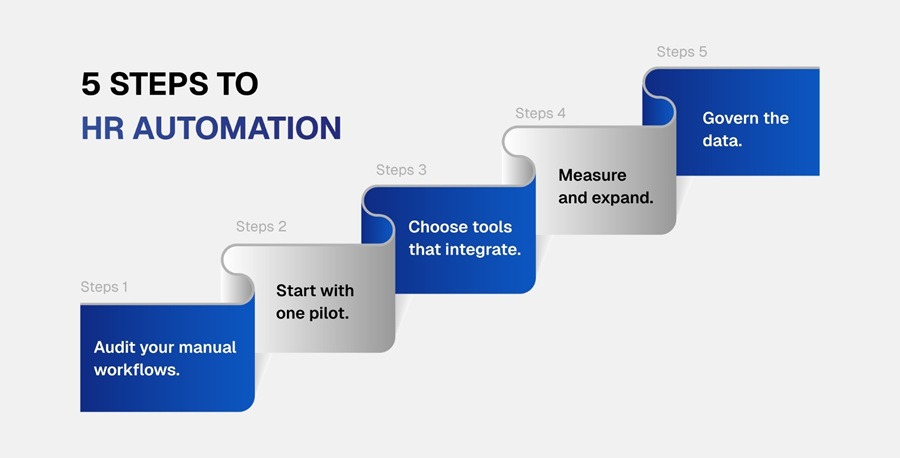
Step 1: Audit your manual workflows. Map where your team spends its repetitive hours and identify the highest-volume, most rule-bound tasks, since these offer the fastest and clearest returns.
Step 2: Start with one pilot. Choose a single workflow to automate first, so you can measure the effect precisely and learn how automation fits your team before you commit more widely.
Step 3: Choose tools that integrate. Select software that connects to the systems you already run, because an automated workflow that cannot share data with your core platforms creates new manual work of its own.
Step 4: Measure and expand. Record the baseline before you automate, the staff time the task takes today and how often it produces errors, so you have a clear before-state to compare against. After the workflow goes live, track the same figures, the manual hours now removed and the drop in errors or rework, along with the change in how long the process takes end to end. Those numbers show the return plainly and justify extending automation to the next workflow.
Step 5: Govern the data. Build privacy and access controls into every automated workflow from the start, along with bias checks, since HR data is sensitive and an automated process that mishandles it creates risk at scale. Set the governance clearly for each workflow. Name who owns it and define which decisions the system can make on its own and which require human review. Then document how sensitive data is protected and how errors or bias will be caught and corrected.
Treating automation as a continuous cycle keeps it delivering value over time. The organizations that benefit most refine it in repeated loops, while those that stall tend to treat a single deployment as the end of the project.
Leading HR automation asks more of an HR leader than approving a purchase and moving on. The role calls for a specific set of capabilities. You need to read a workflow well enough to know which parts are safe to automate and which need a person, and enough fluency in the data to judge what the tools report and spot when their output drifts. You also need the governance sense to protect sensitive employee data and keep a human accountable for the decisions the system influences.
Those capabilities sit where HR operations and analytics meet people strategy, which is the ground that structured talent-management development covers. A recognized talent management certification builds that combination deliberately, pairing HR technology and analytics with the strategic foundations the role depends on. You can see how these competencies shape a career in this overview of talent management technology.
The organizations that get the most from automation are led by people who can see past the software to the workforce it serves, which is a talent-management skill before it is a technical one.
HR automation rests on mature tools and measurable returns, so the practical question is where to start. The answer is to pick one workflow and prove the case on a small scale.
Choose your highest-volume, most rule-bound task, such as a recruiting screen or an onboarding checklist that consumes hours each week and automate that one first. Measure the hours it returns and the errors it removes against your baseline, with a person accountable for the exceptions. Then use that result to justify the next workflow. One contained pilot gives you the evidence, and the confidence, to build from there. The leaders who gain the most start deliberately and let each success fund the next.

Prepare your organization for the next era of talent management with a practical framework for building a skills-first, AI-enabled workforce.
Inside the guide:

CredBadge™ is a proprietary, secure, digital badging platform that provides for seamless authentication and verification of credentials across digital media worldwide.
CredBadge™ powered credentials ensure that professionals can showcase and verify their qualifications and credentials across all digital platforms, and at any time, across the planet.

Please enter the License Number/Unique Credential Code of the certificant. Results will be displayed if the person holds an active credential from TMI.